AI translation, inline terminology, cross-file search & replace, and a translation knowledge base – built directly into Trados Studio 2022, 2024 and 2026.
Try free for 14 days Help No credit card required – full access for 14 days, then €20/month.
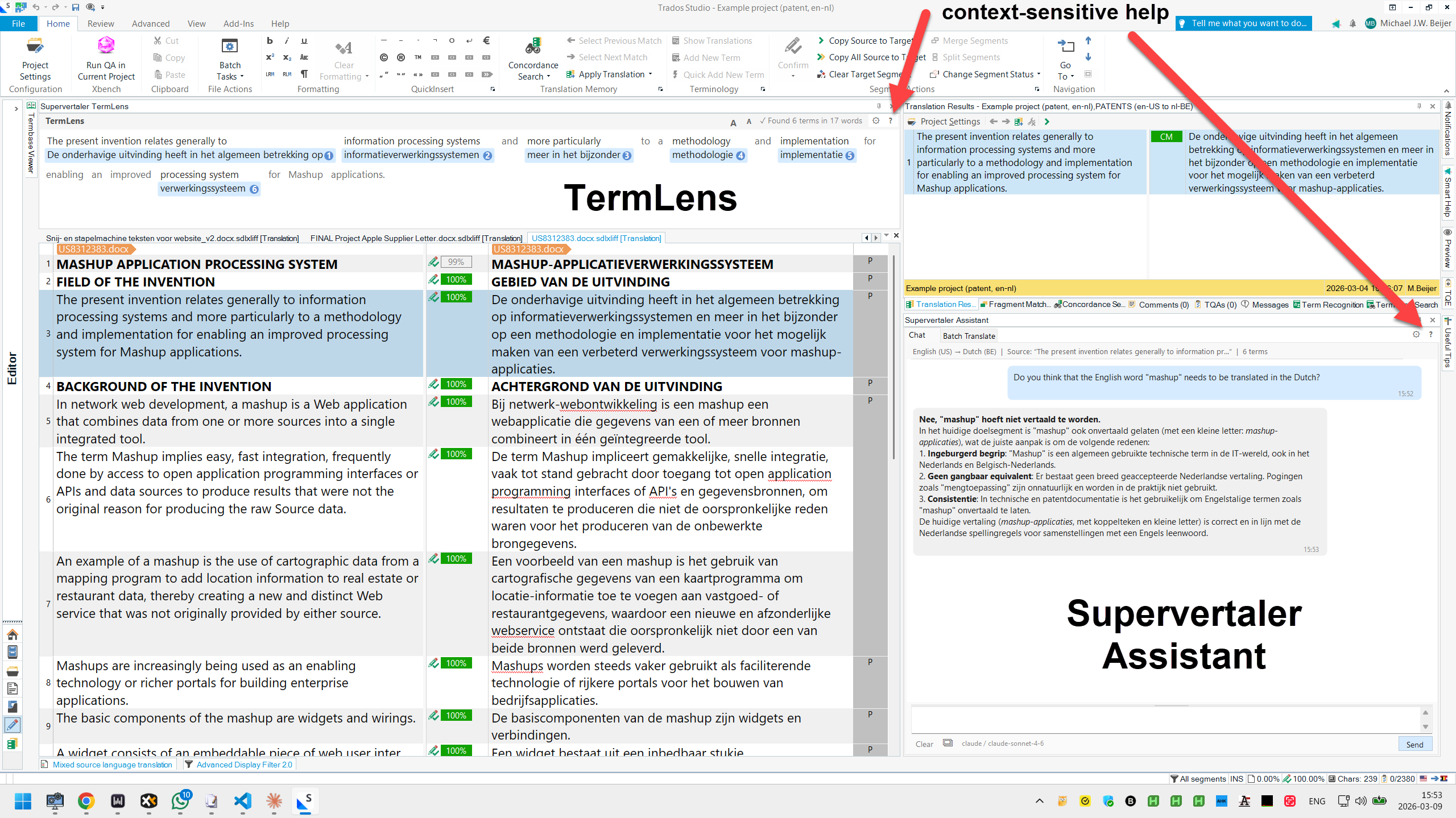
Professional terminology and AI tools inside Trados Studio.
A complete AI translation system with a project-aware chat assistant, batch translation, and a prompt library.
Inline terminology display with colour-coded chips for every matched term, right inside the Trados editor.
.sdltb support – reads termbases attached to your projectCross-file search and find & replace across all SDLXLIFF files in a project – not just the file you have open.
Voice control for Trados Studio – spoken commands, hands-free selection, and a hand-off to your dictation tool. Fully offline.
The client decisions you cannot look up – which term they insist on, what they rejected last time – written down where the AI reads them on every translation.
Feed an AI one sentence at a time and you get good sentences and a poor translation. In Supervertaler, every request assembles a fresh snapshot of your work – ten layers of it – and hands the whole thing to the AI. Some layers come from Studio, some from what you have recorded about the client, and two from parts of the document no CAT tool normally shows you at all.

€20 a month, or €200 a year (two months free)
One licence covers Supervertaler for Trados and Supervertaler for memoQ. Work in memoQ too? It is included – how that works.
Everything is included – AI Assistant and Batch Translate, TermLens, SuperSearch, SuperVoice, SuperMemory, Studio Tools, Clipboard Mode, AutoPrompt, QuickLauncher and the prompt library, MultiTerm support, Incognito Mode, multimodal image support, context-sensitive help, and all future features.
Subscribe Try free for 14 days No credit card · no sign-up · full access for 14 days.
Teams and enterprise. Need multiple seats, volume licensing or invoicing? Get in touch and we will put together a plan that works for your team.
Pricing should never be a barrier. If these rates are a stretch – whether you are just starting out, based in a lower-income region, or going through a tough time – a reduced rate is available. Just get in touch and we will work something out.
Up and running in under a minute.
Install directly from the RWS AppStore.
Double-click the .sdlplugin file. Trados installs it automatically.
Restart Trados Studio. The Supervertaler panel appears in the Editor view.
Questions, bug reports, feature requests, or just want to see how others are using it?
Questions, tips, feature requests and announcements.
Bug reports and feature requests. Requires a free GitHub account.
Your API keys stay between you and your AI provider. Supervertaler for Trados makes no network calls except to your chosen AI provider, the licence server, and optional anonymous usage statistics – strictly opt-in, no personal data, just version and locale. The full source is available on GitHub so you can verify that yourself.
 Supervertaler