Supervertaler

Supervertaler Sidekick

The free toolbox for translators. Select text in any Windows program – a CAT tool, a browser, a PDF, an email – and act on it: look it up in a dozen terminology sources, translate it with several engines at once, run an AI prompt over it, or paste a snippet in its place.

Download free Help For Windows. Free, with no account and no licence. It works beside Supervertaler for Trados and for memoQ, or on its own.
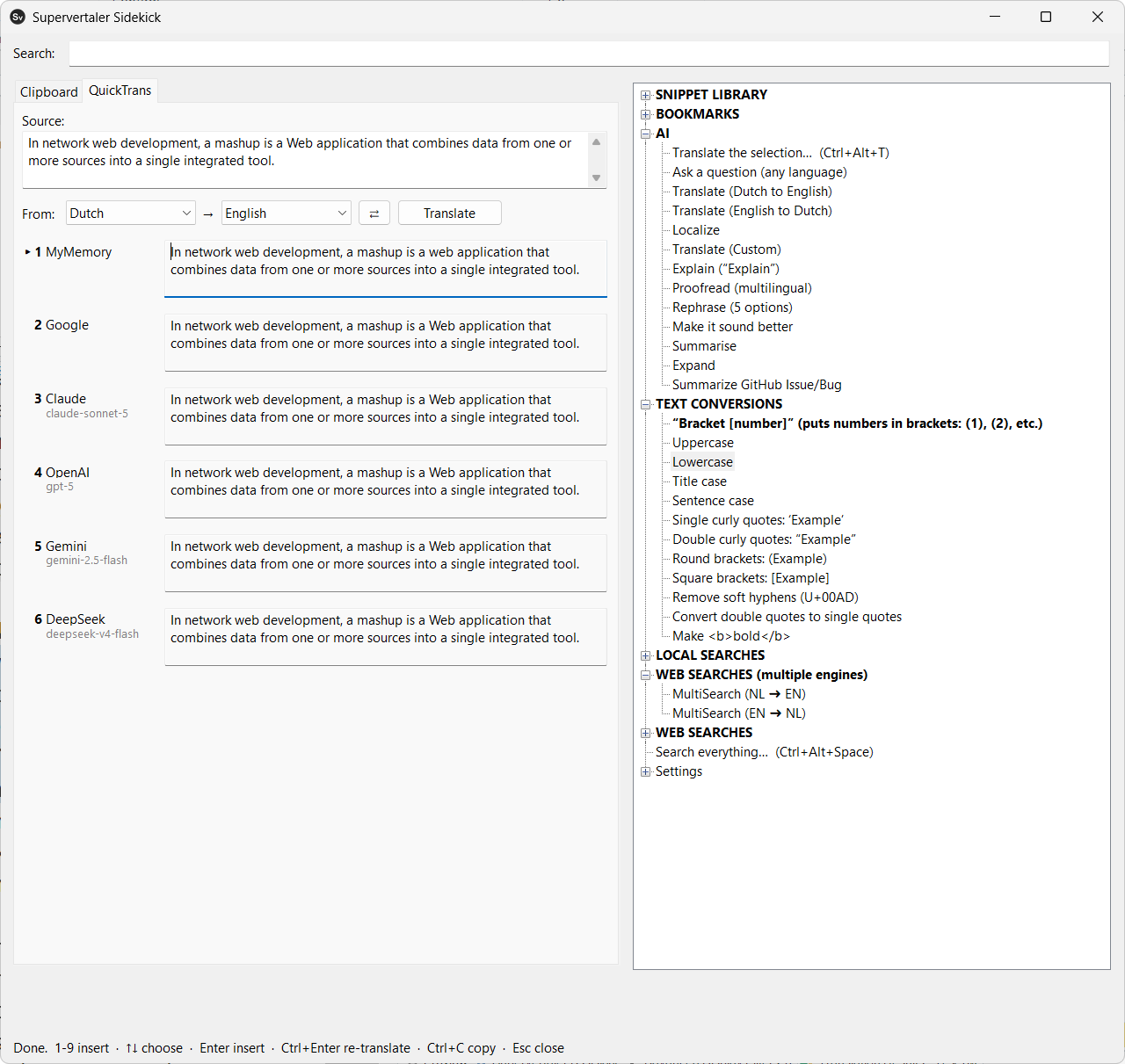
Supervertaler Sidekick's window: on the QuickTrans tab, one sentence translated by six engines at once, each answer numbered for inserting; beside it, the menu of snippets, AI actions, text conversions and searches

What it does

QuickTrans

Select a sentence, press Ctrl+Alt+T, and several engines translate it at once, side by side.

  • MyMemory works straight away, with no key
  • Google, Microsoft, ModernMT and DeepL for machine translation
  • Claude, OpenAI, Gemini, Mistral, DeepSeek and OpenRouter, or a model on your own computer through Ollama
  • Press a number to put the translation you like into the program you came from

Clipboard history

Everything you copy, searchable, and pasted straight back where you were working.

  • Survives a restart
  • Entries you have used are ticked, so you can work down a list of terms without losing your place
  • Programs you would rather it ignored can be left out, and capture paused at any time

Terminology searches

Select a term and look it up – in one source, or in a whole batch at once in a fresh browser window.

  • IATE, Juremy, Linguee, ProZ, Reverso, BabelNet, Wikipedia, Wiktionary, Google Patents and more
  • Every source follows the language pair you set, so one entry serves every direction
  • A language pack adds the sources for your pair in one click – Dutch–English so far

AI actions

Any prompt you like, run over the selection: proofread it, rephrase it, explain it, summarise it.

  • Every prompt is yours to change, and new ones are a few lines
  • Your own API keys – the same ones Supervertaler for Trados and for memoQ use, entered once

Snippets and text expansion

The things you type over and over, a keystroke away.

  • Snippets, special characters and standard replies inserted at the cursor
  • Type an abbreviation and get the full text – thousands of them with no delay
  • Upper, lower, title and sentence case, curly quotes and brackets around the selection
  • Keys for €, en and em dashes and curly quotes, each one yours to change

One window, your keys

Press ` (backtick) and your clipboard history and the whole menu open side by side.

  • Ctrl+Alt+Space puts one search box over everything Sidekick knows
  • A Scratchpad for the note you need to jot down now
  • Every key can be changed, limited to one program, or made a double tap of Ctrl

Installation

One installer. It needs no administrator rights and brings everything Sidekick runs on with it.

Download and run

Download the installer and run it. Windows may say Windows protected your PC, because the installer is not signed yet: click More info, then Run anyway.

Choose a folder

It suggests a folder inside your Supervertaler data folder. Your menu, clipboard history, notes and settings are kept there too, so pick somewhere you will find again.

Press the backtick

Sidekick sits in the system tray. ` opens its window; Ctrl+Alt+T translates the selection. Add API keys when you want the AI engines.

Full installation guide · All Sidekick docs · Release notes · Source code

↑